Situation
Product updates were shipping faster than users could discover them. When I joined Zeabur, users repeatedly told us they had not known about features we had released.
User feedback: discovering useful features only after they had already been available.
At first, these discoveries could be exciting. As the pace of iteration picked up, the communication gap began to undermine the brand image and user trust.
Working with the product manager, I identified 2 priorities:
- Keep existing users informed through proactive product updates.
- Improve onboarding so users could discover the product’s value earlier.
Engagement touchpoints considered
- Product awareness: Newsletters, release notes and in-app announcements to keep users informed about new features and product updates.
- Onboarding and activation: Welcome emails, setup checklists and contextual guidance to help new users reach their first meaningful outcome.
- Feature adoption: Tutorials, use cases and behaviour-triggered messages to help existing users discover and use relevant features.
- Feedback and dialogue: In-app surveys, email replies and community conversations to understand users’ needs and identify friction.
- Re-engagement: Targeted emails to reconnect with inactive users through relevant updates or reminders.
Task
We selected 2 initial approaches:
| During product use | Beyond the product |
|---|---|
| In-app notification automation | Newsletter and Discord changelog bot |
| Surface updates while users are in the product | Proactively bring updates to users |
My scope: the changelog-to-newsletter flow. I was responsible for the pre-product journey, bringing scattered updates into a single touchpoint where users could discover them and we could track their interactions.
The goal: bring readers back to the website and product, supporting DAU/MAU growth and engagement.
Action
Observing the existing manual workflow
I started by examining the existing manual workflow, drawing on my own experience of producing newsletters to map how scattered updates became user-facing communications.
I also drew on "newsroom" practices in the media industry to structure the workflow: gathering source material, selecting stories, deciding their angles (captured in an editorial brief), and reviewing content before publication. This helped me distinguish editorial decisions that required human judgement from production tasks that could be standardised and supported by AI.
Defining the baby steps of automation
I broke down the entire workflow into smaller nodes and worked through each one manually at first. At this stage, I kept the agent’s role focused on research and summarising source material, while I handled editorial decisions, defined the checkpoints at each step and moved the work between stages.
Working through the steps helped me understand what information each node needed, what it should produce, and where my judgement was required. What surprised me most was that "briefing" took up the most time in the process.
Even in the AI era, the principle of garbage in, garbage out still applies. If you feed the workflow, or whatever tool you use, insufficient context or disorganised information, you will most likely end up doing more work to bring the outcome in line with your expectations.
To make matters worse, when the workflow involves multiple steps and several agents or automations, the source of an error can be especially hard to trace. The workflow can become burdened with additional quality checks, eventually reducing its efficiency.
This matters especially when the work is about precision, narrative and tone, and the meanings behind words. AI knows how to produce text, but not how to write content.
Defining what goes into the brief
I made the briefing structure explicit, so the agent had to organise the context and flag open questions before drafting. The content inventory started with up-to-date records in our internal task-tracking tool and other sources of truth, aligning information about product development across stakeholders.
Individual pieces of information were then developed into detailed story briefs.
ISSUE PRIORITIES
- Recommended stories and why they matter
- Suggested angles
- Decisions to discuss and assets still needed
- Updates to defer or exclude from this issue

STORY BRIEF
1. Product facts
   What is it? What is available, to whom,
   and under what conditions?

2. Reader relevance
   Why should users care?
   Which use cases make the value concrete?

3. Editorial angle and outline
   What should the story focus on?
   In what order should it unfold?

4. Audience framing
   What do different user groups need to understand?

5. Boundaries
   Which claims, internal details or narrative
   angles should be avoided?

6. Intended action
   What should readers do next?
   Where should the CTA lead?

7. Verification and sources
   Which facts or links still need checking?
   What sources support the brief?
This gave me something concrete to review before asking the agent to write: the facts, the angle, the intended action and the unresolved questions. If further questions arose about the facts, I could always trace them back to the original issue for detailed product information.
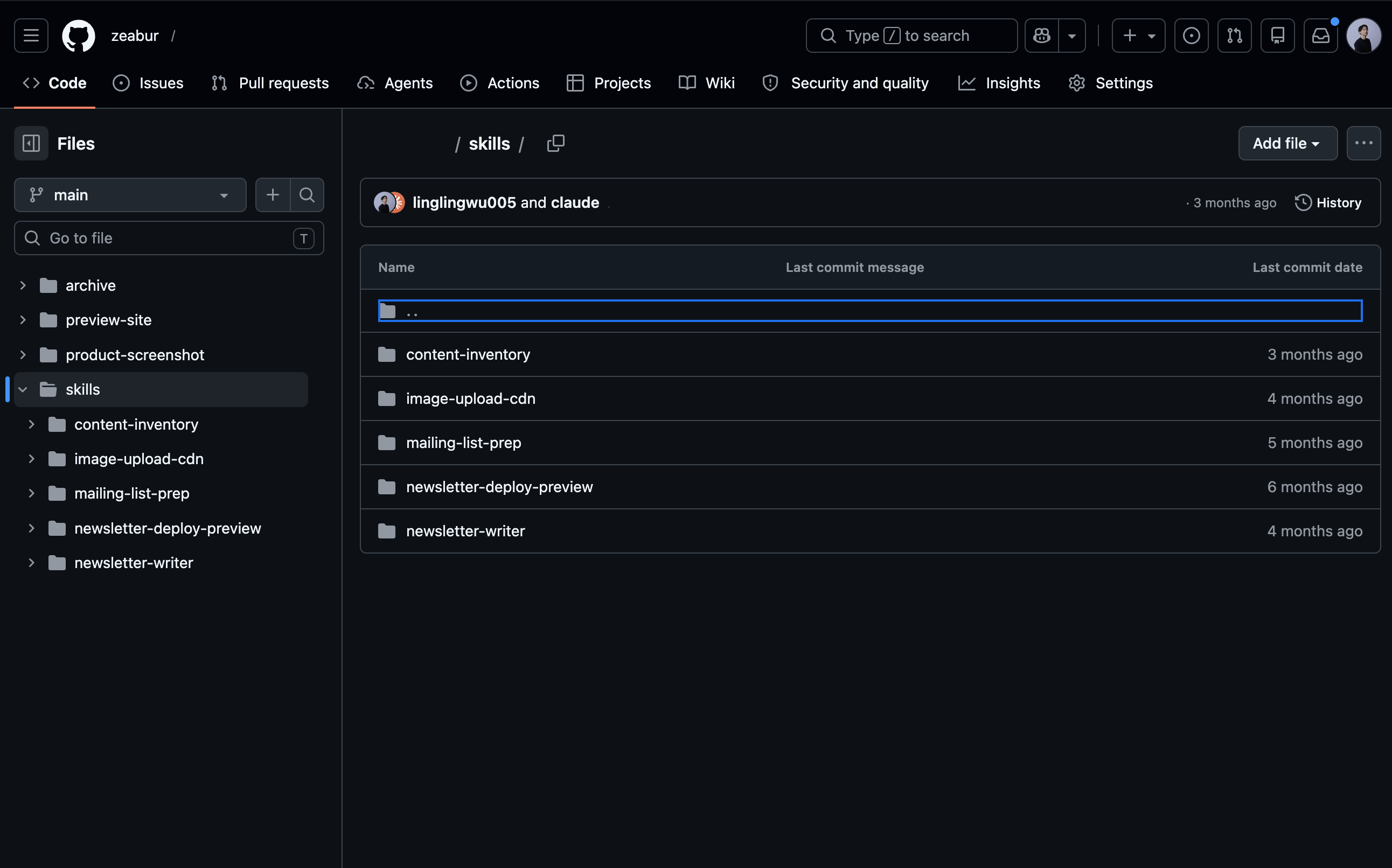
Packaging workflow nodes into reusable skills for team autonomy
After rounds of trial and error, I packaged the production stages into separate agent skills, with shared templates, writing guidelines and publishing checklists. Each skill covered a defined task, while the internal SOP explained how the stages connected and where human review was needed.
flowchart TD
    A[Content Inventory]
    B([Editor Review])
    C[Writing + Translation]
    D[Images + Preview]
    E([Final Quality Review])
    F[List Preparation + Sending]

    A -->|Sources + proposed brief| B
    B -->|Confirmed priorities + angles| C
    C -->|Drafts in 6 languages| D
    D -->|Rendered newsletter| E
    E -->|Reviewed copy + links| F

    class A,C,D,F production;
    class B,E human;
The reusable assets included the instructions as well as the HTML template, tone guide with references and production checklist. I documented them in the internal wiki so members across teams could run the workflow with their agents, using the same references and review criteria.
For the first 2 months after releasing the workflow, I still reviewed all outgoing content from the team. Whoever was drafting and sending an email had to walk me through the final copy and its purpose. After several iterations and internal onboarding, senior teammates could complete the workflow independently, while junior teammates continued to bring their work to me for review.
Touching up the reviewers' experience
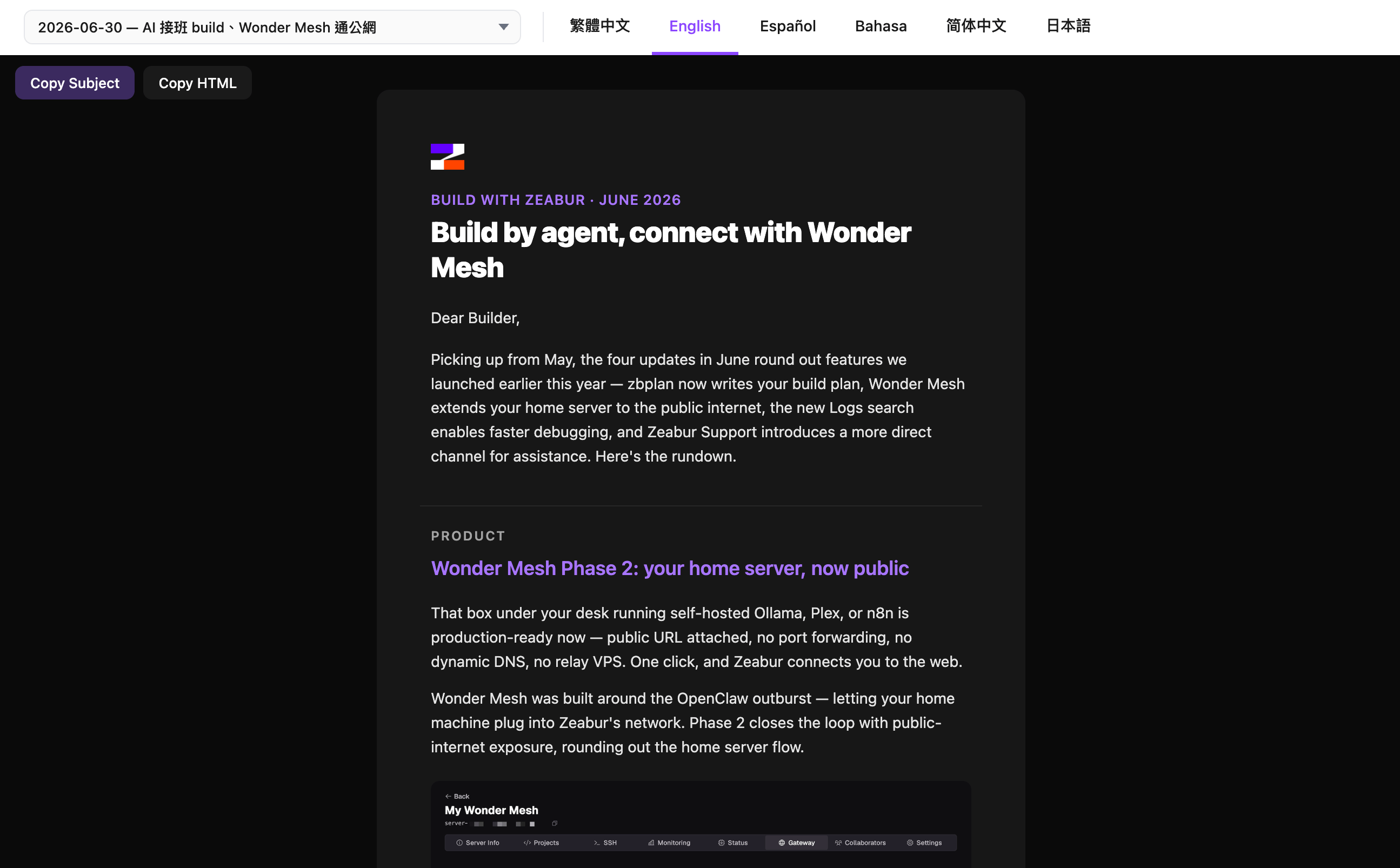
I built a preview site where reviewers could switch between the 6 language versions and inspect the rendered newsletter. This gave the team a shared place to check the copy, images and links before sending. Test emails provided another checkpoint for reviewing how the newsletter appeared in an actual inbox.
I also included tracking conventions in the production guidelines. Campaign and content identifiers in the links made visits attributable to the newsletter and its individual stories. This connected the production workflow back to the engagement objective: understanding which updates brought readers back to the product.
Result
The workflow became a shared production process that teammates could run with their own agents. It supported a monthly newsletter in 6 languages, with reusable instructions, templates and review criteria carried forward between issues.
- Adoption beyond my own work. Colleagues used the documented workflow to prepare and send emails, applying the same quality standards across the team.
- Human-in-the-loop process with team autonomy. Initially, all outgoing content required my review, because it had a significant impact on the brand. As the workflow matured, senior teammates could complete it independently, while I continued to review work from junior teammates.
- Editorial knowledge made reusable. Briefing structures, tone references and production checklists gave teammates a shared basis for making and reviewing decisions. The workflow captured both how to produce the newsletter and what to check before sending it.
For me, the clearest outcome was seeing others take ownership of a process I had initially run myself, without me teaching them step by step or reminding them of every detail (as we all know how operational these marketing tasks can be). Building the automation also meant making the judgement around it explicit enough to teach, review and hand over.
Before building the workflow, I was running the process on my own every week. Around 2–3 teammates working on product notification optimisation also regularly came to me for reviews. The SOP and documented repository significantly reduced the communication gap by making the details and practical know-how explicit.